Signal Preprocessing
Artefacts
Artefacts are non-neural signal disturbances that can arise from movement, electrode instability, muscle activity, flat-line periods, or other sources of noise, and can substantially compromise downstream electrophysiological analyses. Automated artefact detection is therefore an important preprocessing step, particularly in sleep recordings where artefacts may vary across stages, channels, and recording sessions.
Seapipe provides this functionality via S.A.N.D. (Seapipe Artefact and Noise Detection) - another automated framework for detecting and annotating artefactual segments in sleep recordings. Artefacts can be identified using previously published YASA-based approaches (standard deviation- or covariance-based detection) or using the Seapipe method, which detects flat-lines, high-frequency movement artefacts, and large signal deflections. Detected artefacts are written to the annotations file and can be applied across all channels jointly or to each channel individually.
These cases are different from Signal Quality in that they contaminate a signal for temporary and transient periods of the recording. Some examples of artefacts include:
Flatlines in data
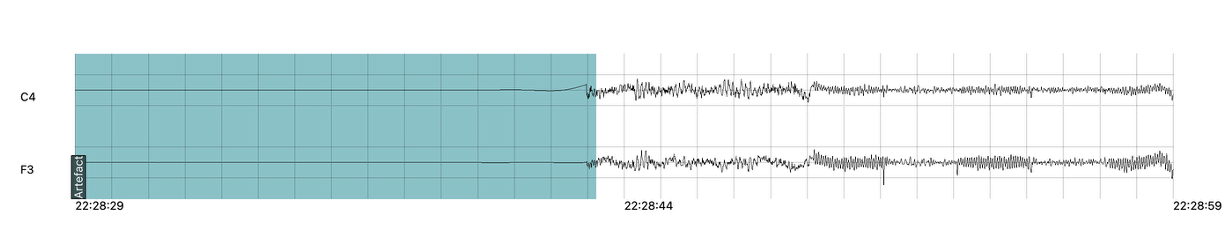
Large shifts in fast frequencies (>40Hz)
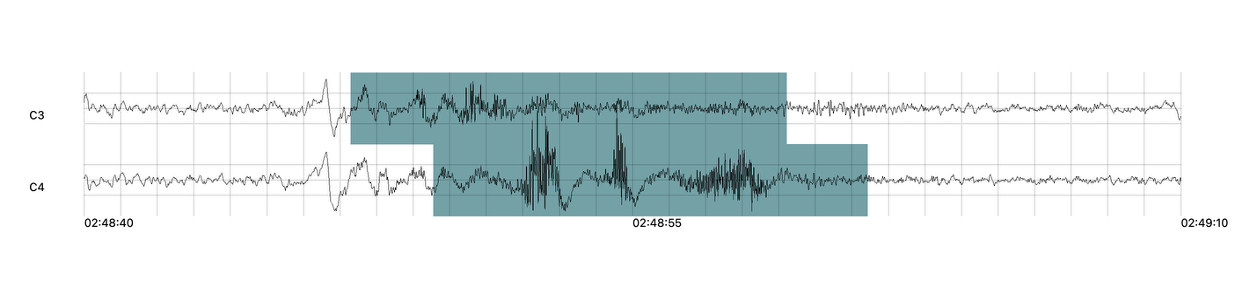
Large deflections in signal

When to use S.A.N.D
S.A.N.D. is designed for use during preprocessing, before event detection, spectral analysis, or other downstream signal analyses. It is especially useful when recordings contain visible artefacts, when artefact burden is expected to vary across channels or subjects, or when standardised artefact annotation is required across large datasets. By automatically detecting and annotating noisy segments, S.A.N.D. facilitates reproducible data cleaning and helps reduce the influence of non-physiological signal disturbances on subsequent analyses.
- Seapipe offers automated artefact detection with the options:
YASA (standard deviation)
YASA (covariance)
Seapipe’s in-house artefact detection, which will detect the 3 artefact types listed above.
Functions to implement S.A.N.D
Detect artefacts:
project.detect_artefacts()
/sub-XXX/ses-XXX in <rec_dir> and write 'Arefact' events directly in the Annotations files file inside <xml_dir>.Detect Artefacts
Command line argument:
project.detect_artefacts(xml_dir = None,
                         out_dir = None,
                         subs = 'all',
                         sessions = 'all',
                         filetype = '.edf',
                         method = 'seapipe',
                         win_size = 5,
                         chan = None,
                         ref_chan = None,
                         label = 'Artefact',
                         allchans_marker = False,
                         rater = None,
                         grp_name = 'eeg',
                         stage = ['NREM1', 'NREM2', 'NREM3', 'REM'],
                         outfile = True)
Positional arguments:
- xml_dir (str)
Path to the directory with sub-directories
/sub-XXX/ses-XXXcontaining the input Annotations files.Default is
Nonewhich will point to<root_dir>/derivatives/staging/(Annotations files with sleep stage markings and arousal/artefact events).- out_dir (str)
Output path for the .xml file containing the new detected event (events will be named like the method used; e.g.,
Artefact)Default is
Nonewhich will point to<root_dir>/derivatives/spindle/- subs (str, NoneType or list)
Subject IDs to analyze
Acceptable options:
Default is
'all'which will point to all thesub-XXX/directories in<root_dir>/rawdata/Entering
Nonewill point seapipe to the sub column in the tracking fileEntering a list of sub IDs (e.g.,
['sub-01', 'sub-02']) will result in detections for those subjects only- sessions (str, NoneType or list)
Session IDs to analyse per subject
Acceptable options:
Default is
'all'which will point to all theses-XXX/directories within thesub-XXX/directories in<root_dir>/rawdata/Entering
Nonewill point seapipe to the ses column in the tracking fileEntering a list of ses visits (e.g.,
['ses-V1', 'ses-V2']) will result in detections for those session(s) within each subject only- filetype (str)
Format of files containing EEG signal
Acceptable options:
Default is
'.edf'formatThe pipeline can also read
.eeg,.setformats- method (str)
The method to use for artefact detection.
Acceptable options:
Default is
'seapipe'Seapipe’s in-house artefact detection.The pipeline also accepts
'yasa_covar'and'yasa_std'methods. For more information see the YASA documentation- win_size (int)
The window size used in artefact detection. If using
method = 'yasa_covar'ormethod = 'yasa_std'this corresponds to the window length (resolution) for artifact rejection, in seconds. Shorter windows (e.g. 1 or 2-seconds) will drastically increase computation time when method=’covar’. If usingmethod = 'seapipe'this only corresponds to the size of the sliding window used to detect shifts in fast frequencies.Acceptable options:
Default is
5corresponding to 5 seconds.- chan (NoneType or list)
Channel(s) of interest
Acceptable options:
Default is
Nonewhich will point to the chanset columns in the tracking fileEntering a list of channel names (e.g.,
['Fz', 'Cz']) will only detect the selected channels (see NOTE in section Channel Names)- ref_chan (NoneType or list)
Reference channel(s) for the channels of interest (e.g., mastoid A1 or A2 or joint mastoids)
Acceptable options:
Default is
Nonewhich will point to the refset columns in the tracking file. NOTE If the tracking file or no refset columns exist, then channels will not be re-referenced!Entering a list of channel names (e.g.,
['A1', 'A2']) will re-reference to these channelsEntering an empty list (i.e.,
[]) will perform no re-referencing- label (str)
The label name to be applied to detected artefacts. Default is
'Artefact'- allchans_marker (bool)
This informs the function to add labels on a specific channel or across all channels. Sometimes it can be faster to apply Artefact tagging across all channels, but this comes with a loss in specificity.
Acceptable options:
Default is
Falsemeaning'Artefact'labels will be applied to each channel specified inchanindependently.Setting this to
Truecan be used to apply Artefact tags to all channels.- rater (NoneType or list)
Name of the rater in the Annotations file to save the detections under
Acceptable options:
Default is
Nonewhich will discard the name of the rater.Note
This assumes there is only one rater per Annotations file (
.xml) !! make sure you don’t have multiple raters!!
Entering a list of rater names (e.g.,
[<Rater1>, <Rater2>]) will only save detected events on this rater in the Annotations file- grp_name (str)
Name of the tab in the Annotations file to save the detections to. This is for visualization in Wonambi only, however it will impact the exporting <Export slow oscillations characteristics> of events also
Acceptable options:
Default is
eegwhich is the recommended naming conventionEntering a list of group names (e.g.,
['eeg_hemiR']) will save the events to a tab of this name in the Annotations file. The events can only be visualised in Wonambi with a montage that includes a tab with this name- stage (list)
Stages of interest
Acceptable options:
Default is
['NREM2', 'NREM3']Entering a list of stages (e.g.,
['NREM3']), it will only detect the events for this specific stage. It is recommended that you leave the default optionoutfile (bool or str)
Whether to log the process.
Acceptable options:
True, writes log to auto-generated timestamped file in self.log_dir.
str, writes log to the specified file path.
False, logs only to console.