Slow Oscillations
Overview
Slow oscillations (SOs) are coherent waves corresponding to the alternation between biphasic membrane potential levels (UP states = depolarization and DOWN states = hyperpolarization). Oscillating below ~1 Hz, SOs are generated during sleep stages NREM2 and NREM3.
Staresina et al. (2015): SO detection (<1.25Hz) with an adapted amplitude criteria per individual and channel.
Method in brief:
Filter the signal (FIR bandpass filter, 0.5–1.25 Hz, order = 3);
Identify events with a positive-to-negative zero crossing and a subsequent negative-to-positive zero crossing separated by 0.8-2 sec;
Keep the top 25% of events with the largest trough-to-peak amplitudes.
Ngo et al. (2015): Slow wave detection (<3.5Hz) with an adapted amplitude criteria per individual averaged across several channels.
Method in brief:
Filter the signal (FIR lowpass filter, 3.5 Hz);
Identify events with a positive-to-negative zero crossing and a subsequent negative-to-positive zero crossing separated by 0.833-2 sec;
Keep the events with a negative peak amplitude lower than 1.25 times the mean negative peak amplitude per subject.
Massimini et al. (2004): SO detection with a rigid amplitude criteria.
Method in brief:
Filter the signal (FIR bandpass filter, 0.1-4 Hz);
Identify events with a positive-to-negative zero crossing and a subsequent negative-to-positive zero crossing separated by 0.3-1 sec;
Keep the events with a negative peak less than -80 uV,;
Keep the events with a negative-to-positive peak-to-peak amplitude >140 uV.
Adapted Massimini et al: adapted SO detection with rigid amplitude criteria (lowered based on AASM criteria for slow wave activity).
Method in brief:
Same as Massimini et al. 2004, except to keep the events with a negative-to-positive peak-to-peak amplitude >75 uV.
polarity of recordings
The shape and orientation of slow oscillations depends on the manner of recording, specifically whether they are detected from inside (intracranial EEG, iEEG) or from outside (scalp EEG) the brain.
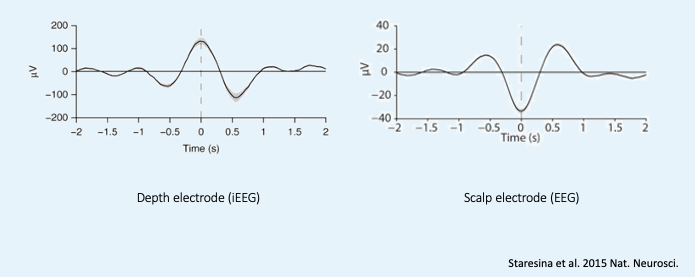
When working with scalp EEG, it is also common that recordings are ‘inverted’ before they are exported. The importance of keeping track of the polarity of the EEG data is related to which direction corresponds to the (‘UP’ or ‘DOWN’), as this will determine the underlying physiological and biological interpretation! This is especially relevant when running Phase-Amplitude Coupling. Therefore it is recommended that you confirm the polarity of your recordings prior to commencing any analyses.
Functions to detect Slow Oscillations
Detect slow oscillation events:
project.detect_slow_oscillations()
/sub-XXX/ses-XXX in <xml_dir> to <root_dir>/derivatives/slowwave/ and write in the detected events.Export event characteristics:
project_name.export_eventparams()
.csv file for every channel and/or stage and/or cycle into every /sub-XXX/ses-XXX directory in <root_dir>/derivatives/slowwave/Create datasets combining all the subjects:
project_name.event_dataset()
.csv files from the previous step into a single dataset (one row per subject) <root_dir>/derivatives/datasets/Detect slow oscillations
Command line argument:
project.detect_slow_oscillations(xml_dir = None,
                                 out_dir = None,
                                 subs = 'all',
                                 sessions = 'all',
                                 filetype = '.edf',
                                 method = ['Staresina2015'],
                                 chan = None,
                                 ref_chan = None,
                                 rater = None,
                                 grp_name = 'eeg',
                                 stage = ['NREM2','NREM3'],
                                 cycle_idx = None,
                                 duration = (0.2, 2),
                                 invert = None,
                                 reject_artf = None,
                                 average_channels = False,
                                 outfile = True)
Positional arguments:
- xml_dir (str)
Path to the directory with sub-directories
/sub-XXX/ses-XXXcontaining the input Annotations files.Default is
Nonewhich will point to<root_dir>/derivatives/staging/(Annotations files with sleep stage markings and arousal/artefact events).- out_dir (str)
Output path for the .xml file containing the new detected event (events will be named like the method used; e.g.,
Staresina2015)Default is
Nonewhich will point to<root_dir>/derivatives/slowwave/- subs (str, NoneType or list)
Subject IDs to analyze
Acceptable options:
Default is
'all'which will point to all thesub-XXX/directories in<root_dir>/rawdata/Entering
Nonewill point seapipe to the sub column in the tracking fileEntering a list of sub IDs (e.g.,
['sub-01', 'sub-02']) will result in detections for those subjects only- sessions (str, NoneType or list)
Session IDs to analyse per subject
Acceptable options:
Default is
'all'which will point to all theses-XXX/directories within thesub-XXX/directories in<root_dir>/rawdata/Entering
Nonewill point seapipe to the ses column in the tracking fileEntering a list of ses visits (e.g.,
['ses-V1', 'ses-V2']) will result in detections for those session(s) within each subject only- filetype (str)
Format of files containing EEG signal
Acceptable options:
Default is
'.edf'formatThe pipeline can also read
.eeg,.setformats- method (list)
Method for SO detection
Acceptable options:
Default is
['Staresina2015']methodOnly
['Staresina2015', 'Massimini2004', 'AASM/Massimini2004']methods can be run simultaneously.['Ngo2015']can only be runned separately withaverage_channels = True- chan (NoneType or list)
Channel(s) of interest
Acceptable options:
Default is
Nonewhich will point to the chanset columns in the tracking fileEntering a list of channel names (e.g.,
['Fz', 'Cz']) will only detect the selected channels (see NOTE in section Channel Names)- ref_chan (NoneType or list)
Reference channel(s) for the channels of interest (e.g., mastoid A1 or A2 or joint mastoids)
Acceptable options:
Default is
Nonewhich will point to the refset columns in the tracking file. NOTE If the tracking file or no refset columns exist, then channels will not be re-referenced!Entering a list of channel names (e.g.,
['A1', 'A2']) will re-reference to these channelsEntering an empty list (i.e.,
[]) will perform no re-referencing- rater (NoneType or list)
Name of the rater in the Annotations file to save the detections under
Acceptable options:
Default is
Nonewhich will discard the name of the rater.Note
This assumes there is only one rater per Annotations file (
.xml) !! make sure you don’t have multiple raters!!
Entering a list of rater names (e.g.,
[<Rater1>, <Rater2>]) will only save detected events on this rater in the Annotations file- grp_name (str)
Name of the tab in the Annotations file to save the detections to. This is for visualization in Wonambi only, however it will impact the exporting <Export slow oscillations characteristics> of events also
Acceptable options:
Default is
eegwhich is the recommended naming conventionEntering a list of group names (e.g.,
['eeg_hemiR']) will save the events to a tab of this name in the Annotations file. The events can only be visualised in Wonambi with a montage that includes a tab with this name- stage (list)
Stages of interest
Acceptable options:
Default is
['NREM2', 'NREM3']Entering a list of stages (e.g.,
['NREM3']), it will only detect the events for this specific stage. It is recommended that you leave the default option- cycle_idx (NoneType or tuple)
Sleep cycle numbers
Acceptable options:
Default is
Nonewhich will infer no cyclesEntering a tuple of integers corresponding to sleep cycle numbers (e.g.,
(1,2,3,4,5)), it will only detect the events for these specificcycles’ numbers. If a
subhas less than the number of cycles entered, then the maximum number of cycles possible will be used for that subject.- duration (tuple)
Minimum and maximum duration of events that will be detected. Any events with durations that are outside these limits will be discarded
Acceptable options:
Default is
(0.2, 2)Entering a tuple of float with length 2 (e.g.,
(0.5, 1)) will limit the detection to events with a duration within this range- invert (NoneType or logical)
Option to invert polarity
Acceptable options:
Default is
Nonewhich will point to the chanset_invert columns in the tracking file. However, if the tracking file does not specify chanset_invertcolumns, the detection will default to
False
Entering
Falsewill keep the polarity of the recording as it isEntering
Truewill reverse (flip) the polarity of the recording- reject_artf (list, NoneType, or bool)
Options to discard detection within specific events such as Artefact events
Acceptable options:
Default is
Nonewhich will use the default labels['Artefact', 'Arou', 'Arousal']Entering a list of events (e.g.,
['Artefact', 'Arou']) will discard detection within those eventsEntering
Falsewill disable artefact rejection- average_channels (logical)
Options to average multiple channels before the detection
Default is
FalseOnly pass
Trueif using the['Ngo2015']method- outfile (str or logical)
Logging of detection
Acceptable options:
Default is
Truewhich will create a logfile detect_slowosc_{method}_{datetime}_log.txt in<root_dir>/derivatives/audit/logs/Entering a string
<custom_outfile_name.txt>will save the logfile under that custom nameEntering
Falsewon’t save a logfile
Export slow oscillations characteristics
Command line argument:
project.export_eventparams(evt_name,
                           frequency = None,
                           xml_dir = None,
                           out_dir = None,
                           subs = 'all',
                           sessions = 'all',
                           chan = None,
                           ref_chan = None,
                           stage = ['NREM2','NREM3'],
                           grp_name = 'eeg',
                           rater = None,
                           cycle_idx = None,
                           concat_cycle = True,
                           concat_stage = False,
                           keyword = None,
                           segs = None,
                           params = 'all',
                           epoch_dur = 30,
                           average_channels = False,
                           outfile = True)
Required arguments:
- evt_name (list or str)
Name of the event of interest to export from the Annotations file
Enter a string (e.g
Staresina2015) which refers to the event as it is named in the Annotations file. NOTE This will be the method name used in the detectionEntering a list of event names (e.g
['Staresina2015', 'Massimini2004']) will export the parameters for each event separately- frequency (tuple)
Frequency range of interest in which to export certain event parameters (e.g. frequency, power)
Positional arguments:
- xml_dir (str)
Path to the directory with sub-directories
/sub-XXX/ses-XXXcontaining the Annotations files where the detections were saved.
Default is
Nonewhich will point to<root_dir>/derivatives/slowwave/- out_dir (str)
Output path for the where to save the
.csvfile containing the parameters of the slow oscillation events per subject, session, and/or stage, and/or channel.
Default is
Nonewhich will point toroot_dir/derivatives/slowwave/- subs (str, NoneType or list)
Subject IDs to analyze
Acceptable options:
Default is
'all'which will point to all thesub-XXX/directories in<root_dir>/rawdata/Entering
Nonewill point seapipe to the sub column in the tracking fileEntering a list of sub IDs (e.g.,
['sub-01', 'sub-02']) will the parameters of the slow oscillation events for those subjects only- sessions (str, NoneType or list)
Session IDs to analyze
Acceptable options:
Default is
'all'which will point to all theses-XXX/directories within thesub-XXX/directories in<root_dir>/rawdata/Entering
Nonewill point seapipe to the ses column in the tracking fileEntering a list of session IDs (e.g.,
['ses-V1', 'ses-V2']) will result in detections for those session(s) within each subject only- chan (NoneType or list)
Channel(s) of interest
Acceptable options:
Default is
Nonewhich will point to the chanset columns in the tracking fileEntering a list of channel names (e.g.,
['Fz', 'Cz']) will only export parameters for the events in the selected channels (see NOTE in section Channel Names)- ref_chan (NoneType or list)
Reference channel(s) for the channels of interest (e.g., mastoid A1 or A2 or joint mastoids)
Acceptable options:
Default is
Nonewhich will point to the refset columns in the tracking file. NOTE If the tracking file or no refset columns exist, then channels will not be re-referenced!Entering a list of channel names (e.g.,
['A1', 'A2']) will re-reference to these channelsEntering an empty list (i.e.,
[]) will perform no re-referencingNote
If the reference channels are not the same as were entered in the detection stage, the event parameters will still be stored, however the parameters (e.g. frequency, amplitude, power) might be affected. Be careful to remain consistent across these steps!
- stage (list)
Stages of interest
Acceptable options:
Default is
['NREM2', 'NREM3']Entering a list of stages (e.g.,
['NREM3']), it will only export parameters for the events in this specific stage- grp_name (str)
Name of the tab in the Annotations file where the detected events are saved
Acceptable options:
Default is
eegwhich is the recommended naming conventionIf entering a list of group names (e.g.,
['eeg_hemiR']), ensure that this matchesgrp_nameused in the detection stage- rater (NoneType or list)
Name of the rater in the Annotations file where the detected events are saved
Acceptable options:
Default is
Nonewhich will discard the name of the raterEntering a list of raters names (e.g.,
[<Rater1>, <Rater2>]) will only export the the parameters for events saved under this rater. NOTE An create an empty extraction.csvfile will be created if the rater is absent- cycle_idx (NoneType or tuple)
Sleep cycle numbers
Acceptable options:
Default is
Nonewhich will infer no cyclesEntering a tuple of integers corresponding to sleep cycle numbers (e.g.,
(1,2,3,4,5)) will only detect the events for these specificcycles. If a
subhas less than the number of cycles entered, then the maximum number of cycles possible will be used for that subject- concat_cycle (logical)
Concatenation options for sleep cycles
Acceptable options:
Default is
Truewhich means that all cycles will be concatenated (i.e., merged) before exporting the parameters of the SO eventsEntering
Falsewill export the SO parameters per sleep cycle (saving each cycle as a separate.csvoutput file)- concat_stage (logical)
Concatenation options for stages
Acceptable options:
Default is
Falsewhich means the parameters of SO events will be exported per stage (e.g. NREM2, NREM3) separately (saving each stage as a separate.csvoutput file)Entering
Truewill concatenate (i.e., merge) all stages before exporting the parameters of the SO events- keyword (str)
Allow seapipe to search for a Annotations filename containing a specific wildcard (keyword)
Acceptable options:
Default is
Nonewhich will infer no keyword to search for.Entering a string (e.g.
Staresina_adapted_custom) will only export event parameters from this specific Annotations file- seg (NoneType or list of tuples)
Option to extract parameters of SOs that only occur in between certain markers. These markers need to be events saved in the Annotations file
Acceptable options:
Default is
Nonewhich will infer no segmentation prior to exporting event parametersEntering a list of tuples, with both start and end tags named (e.g.
[('N2_ON', 'N2_OFF'), ('N3_ON', 'N3_OFF')]) will export event parameters that only occur between these event markers- params (str or dict)
The names of specific parameters to export
Acceptable options:
Default is
allwhich will export all characteristics (see Output) - RecommendedTo specify only specific parameters to export, enter a dictionary with
TrueorFalsefor each parameter (e.g.,params = ['dur':True, 'minamp':False, 'maxamp':False, 'ptp':True, 'rms':False, 'power':True, 'peakpf':False, 'energy':False, 'peakef':False])- epoch_dur (int)
Options to change the denominator (duration) for the SO density index
Acceptable options:
Default is
30(this infers 30-second epochs)Entering a number (e.g.,
60) will imply that the SO density value equals the number of events per this time period (e.g. per 60 seconds)- average_channels (logical)
Options to average multiple channels before the detection (Refer to this option in Detect slow oscillations)
Default is
FalseOnly pass
Trueif using the['Ngo2015']method- outfile (str or logical)
Logging of event parameter export
Acceptable options:
Default is
Truewhich will create a logfile export_params_{method}_{datetime}_log.txt in<root_dir>/derivatives/audit/logs/Entering a string
<custom_outfile_name.txt>will save the logfile under that custom nameEntering
Falsewon’t save a logfileNote
By default
export_eventparams cannot extract SOs characteristics without required arguments for
evt_nameandfrequency.export_eventparams will extract characteristics per stage (NREM2 vs NREM3). If you want the extraction for NREM2+NREM3 combined as well, re-run export_eventparams with
concat_stage = True.export_eventparams will extract characteristics for the whole-night. If you want the extraction per cycle, re-run export_eventparams with
concat_cycle = False.
Create datasets
Command line argument: To run per channel and method if using multiple detection methods.
project.event_dataset(chan,
                      evt_name,
                      xml_dir = None,
                      out_dir = None,
                      subs = 'all',
                      sessions = 'all',
                      stage = None,
                      concat_stage = False,
                      concat_cycle = True,
                      cycle_idx = None,
                      grp_name = 'eeg',
                      adap_bands = 'Fixed',
                      params = 'all',
                      outfile=True))
- Required arguments:
- chan (str or list)
Channel(s) of interest
Acceptable options:
Entering a string (e.g
Fz) will create separate datasets for that channel only.Entering a list of channels’ names (e.g.,
['Fz', 'Cz', 'Pz']) will create separate datasets for each channel. The the names will be taken from the chanset_rename columns in the tracking file
- evt_name (str or list)
Name of the events of interest
Acceptable options:
Enter a string (e.g
Staresina2015) which refers to the event as it was used in the export event parameters stepEntering a list of event names (e.g
['Staresina2015', 'Massimini2004']) will create a dataset for each event separately
- Positional arguments:
- xml_dir (str)
Path to the directory with sub-directories
/sub-XXX/ses-XXXcontaining the.csvfiles from the export event parameters stepAcceptable options:
Default is
Nonewhich will point to<root_dir>/derivatives/slowwave/
- out_dir (str)
Output path for the created datasets
Acceptable options:
Default is
Nonewhich will point to<root_dir>/derivatives/datasets/
- subs (str, NoneType or list)
Subject IDs to export into the dataset
Acceptable options:
Default is
'all'which will point to all thesub-XXX/directories in<xml_dir>/Entering
Nonewill point seapipe to the sub column in the tracking fileEntering a list of sub IDs (e.g.,
['sub-01', 'sub-02']) will export those subjects only into the dataset
- sessions (str, NoneType or list)
Session IDs to export into the dataset
Acceptable options:
Default is
'all'which will point to all theses-XXX/directories within thesub-XXX/directories in<xml_dir>/Entering
Nonewill point seapipe to the ses column in the tracking fileEntering a list of session IDs (e.g.,
['ses-V1', 'ses-V2']) will export those sessions only into the dataset
- stage (list)
Stages of interest
Acceptable options:
Default is
Nonewhich will create datasets for all stages extracted in the export event parameters stepEntering a list of stages (e.g.,
['NREM3']) will only export parameters for the events in this specific stageNote
This will only work if the export event parameters step was run with
concat_stage = False
- concat_stage (logical)
Concatenation options for stages
Acceptable options:
Default is
Falsewhich will create datasets per stage (NREM2 vs NREM3) separately (saving each stage as a separate.csvoutput file)Entering
Truewill concatenate (i.e., merge) all stages before exporting the parameters of the SO events
Note
Pay caution to how the argument
concat_stagewas defined in the export event parameters step . If in this step (Create datasets) the argument is set to:concat_stage = False, but in the export event parameters step this was set toconcat_stage = True, then this will fail as the SO events have not been exported for stages combined. The previous step will need to be re-run withconcat_stage = False
- concat_cycle (logical)
Concatenation options for sleep cycles
Acceptable options:
Default is
Truewill create datasets for all cycles concatenated (i.e., merged) in one.csvdataset file.Entering
Falsecreate datasets per sleep cycle separately (saving each cycle as a separate.csvoutput file)
Note
Similar to
concat_stage- pay caution to how the argumentconcat_cyclewas defined in the export event parameters step . If in this step (Create datasets) the argument is set to:concat_cycle = False, but in the export event parameters step this was set toconcat_cycle = True, then this will fail as the SO events have not been exported for stages combined. The previous step will need to be re-run withconcat_cycle = False
- cycle_idx (NoneType or tuple)
Cycles of interest
Acceptable options:
Default is
Nonewhich will infer to not take into consideration the cycle and either extract cycle for the whole night ifconcat_cycle = True
or for all the cycles if
concat_cycle = FalseEntering list of cycle numbers (e.g.,
[1,2,3]) will extract the SO parameters for those cycles only. It requires that you have
defined
cycle_idxduring export event parameters and have also set upconcat_cycle = False.
- grp_name (str)
Name of the tab in the Annotations file where the detected events are saved
Acceptable options:
Default is
eegwhich is the recommended naming conventionIf entering a list of group names (e.g.,
['eeg_hemiR']), ensure that this matchesgrp_nameused in the export event parameters step
- params (str or dict)
The names of specific parameters to export into the dataset
Acceptable options:
Default is
allwhich will export all characteristics (see Output) - RecommendedTo specify only specific parameters to export, enter a dictionary with
TrueorFalsefor each parameter (e.g.,params = ['dur':True, 'minamp':False, 'maxamp':False, 'ptp':True, 'rms':False, 'power':True, 'peakpf':False, 'energy':False, 'peakef':False])
- outfile (str or logical)
Logging of event parameter export
Acceptable options:
Default is
Truewhich will create a logfile event_dataset_{method}_{datetime}_log.txt in<root_dir>/derivatives/audit/logs/Entering a string
<custom_outfile_name.txt>will save the logfile under that custom nameEntering
Falsewon’t save a logfile
Hint
To combine datasets, use the trawl function (see XXXX)
Outputs of Slow Oscillations
Parameters of SOs characteristics:
Count : Number of SOs detected
Density : Mean number of SOs detected per period (e.g., 30s, 60s - depend on
epoch_durargument in export_eventparams)Duration_mean : Mean SOs duration (s)
Duration_stdv : Standard deviation of SOs duration (s)
Min_amplitude_mean : Mean amplitude of the SOs trough (uV)
Min_amplitude_stdv : Standard deviation of the amplitude of the SOs trough (uV)
Max_amplitude_mean : Mean amplitude of the SOs peak (uV)
Max_amplitude_stdv : Standard deviation of the amplitude of the SOs peak (uV)
Ptp_amplitude_mean : Mean peak-to-peak SOs amplitude (uV)
Ptp_amplitude_stdv : Standard deviation of the peak-to-peak SOs amplitude (uV)
Power_mean : Mean absolute spectral power within the
frequencyrange set in export_eventparams (uV2)Power_stdv : Standard deviation of the absolute spectral power within the
frequencyrange set in export_eventparams (uV2)Peak_power_frequency_mean : Mean peak power frequency of the SO events (Hz)
Peak_power_frequency_stdv : Standard deviation of the peak power frequency of the SO events (Hz)